Behind the Scenes of GitHub Actions: The Real Difference Between Hosted and Self-Hosted Runners

Computer Engineer | DevOps & Cloud Enthusiast | Building scalable apps & automating everything that can be automated 💡 | Writing to simplify tech & share real-world learnings
In the last few years, the way we build, test, and ship software has changed dramatically. DevOps pipelines are no longer “nice-to-have”; they’re the backbone of any serious development workflow.
And in this world, GitHub Actions has become one of the most popular automation platforms—largely because of one simple concept: runners.
If you’ve ever triggered a workflow, pushed code, or reviewed a pull request, a runner is the quiet worker behind the scenes that actually executes your instructions. But not all runners are equal, which brings us to the two kinds GitHub offers:
GitHub Hosted Runners
Self-Hosted Runners
Both exist for very good reasons, and both have unique strengths that make them essential for different kinds of projects.
Let’s break this down properly, in simple and practical terms.

1. What Exactly Are GitHub Runners?
Whenever you define a GitHub Actions workflow—say a YAML file that installs dependencies, runs tests, or deploys your app—those steps don’t run on your laptop or your server automatically.
They run on a runner, which is basically:
A machine (virtual or physical)
That GitHub can communicate with
Which executes each step of your CI/CD pipeline in order
Think of it like this:
You write the recipe; the runner is the chef who follows it line by line.
2. GitHub Hosted Runners
The effortless option—fast, clean, and fully managed
2.1 What They Really Are
GitHub Hosted Runners are virtual machines that GitHub spins up for you on demand.
You don’t install anything.
You don’t configure anything.
You don’t clean anything afterward.
A job starts → GitHub gives you a fresh VM → job finishes → VM is destroyed.
Perfect isolation, every single time.
You can choose from:
Linux (Ubuntu)
Windows Server
macOS (needed for iOS builds)
ARM systems
Larger runner variations (multi-core, higher RAM)
2.2 Why Developers Love Them
✓ No maintenance, no headaches
GitHub handles everything: updates, patches, security, tooling—literally everything.
✓ A fresh start every run
This means reproducible builds, no leftover cache issues, no stale environments.
✓ Extremely easy to use
Just write:
runs-on: ubuntu-latest
and you’re done.
✓ Super secure isolation
Every workflow runs in a clean environment.
Great for open-source.
✓ Built-in scaling
You push code → GitHub spins as many runners as required.
2.3 The Downsides Nobody Should Ignore
✗ Limited OS-level customization
You can install packages during runtime, but nothing persists.
✗ Gets expensive for heavy workloads
Long builds, ML training, and large pipelines can significantly increase costs.
✗ No access to private company networks
These runners live in GitHub’s cloud—firewalled away from your internal infrastructure.
3. Self-Hosted Runners
Your machine, your rules, your responsibility
3.1 What They Are in Real Terms
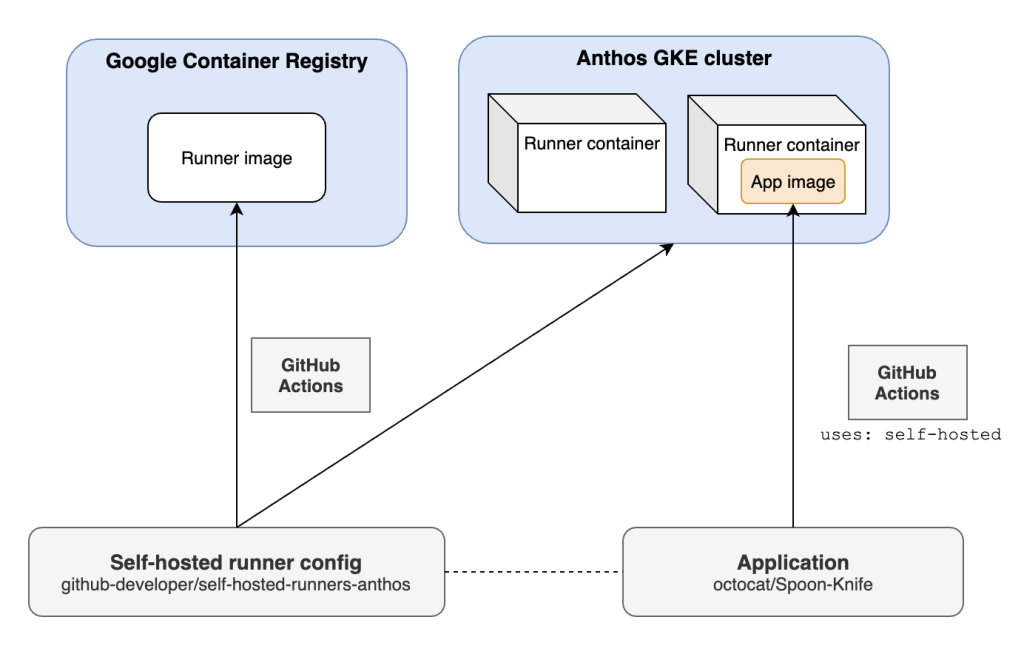
With self-hosted runners, you bring your own machine, install GitHub’s runner agent, and GitHub sends jobs to it.
Your runner could be:
A cloud VM
An on-prem server
A Docker container
A Kubernetes pod
Even a local machine (not ideal for real pipelines)
3.2 Why They’re so Powerful
✓ Total customization
Install anything:
custom dependencies, GPU drivers, private tools, proprietary SDKs—whatever your pipeline needs.
✓ Much cheaper for heavy or long-running tasks
95% of ML teams, game development studios, and large enterprise deployments use self-hosted just for cost control.
✓ Access to private networks
You can safely run deployments inside a company VPC or datacenter.
✓ Run on stronger hardware
Maybe you want:
64 GB+ RAM
32 cores
GPU acceleration
Dedicated build servers
Hosted runners can’t offer this flexibility.
✓ No GitHub minute billing
Your only cost is your machine.
3.3 The Trade-Offs
✗ You maintain everything
OS updates, patches, cleaning, logs, security, disk space—you manage it all.
✗ Security risks
If workflows accept untrusted PRs, someone could execute malicious code on your machine.
✗ Cleanup required
Without proper scripts or containerization, builds can get messy over time.
✗ Setup time is higher
Not a plug-and-play experience like GitHub Hosted.
4. Why Do Both Runners Exist? What Purpose Do They Serve?
This is a crucial question, and the answer is simple:
👉 Because different teams have very different needs.
GitHub hosted runners exist to make CI/CD simple for everyone.
Self-hosted runners exist to give power users full control, better performance, and better cost efficiency.
Together, they cover the entire CI/CD ecosystem—from hobby developers to Fortune 500 companies.
4.1 Significance of GitHub Hosted Runners
They play an essential role by providing:
A zero-maintenance experience
Fast onboarding for beginners
Predictable and reproducible builds
Secure environments for public repos
Massive scalability without configuration
Perfect for open-source projects and standard build/test pipelines.
4.2 Significance of Self-Hosted Runners
These matter because some workloads are simply too large, too private, or too specialized for shared cloud runners.
They allow:
HPC workloads
GPU-based workflows
Private deployments
Compliance-bound environments
Large mono-repo builds
In short: enterprises cannot survive without self-hosted runners, while individuals and smaller teams often prefer the convenience of GitHub-hosted ones.
5. Side-by-Side Comparison
| Feature | GitHub Hosted Runners | Self-Hosted Runners |
| Ownership | GitHub | You |
| Cost | Billed per-minute | Machine cost only |
| Environment | Always fresh | Persistent |
| Customization | Limited | Fully customizable |
| Scaling | Automatic | Manual (unless scripted) |
| Network Access | No internal network | Full internal access |
| Setup Time | Almost zero | Requires configuration |
| Best For | General CI tasks | Specialized or heavy workloads |
6. So, Which One Should You Pick?
Choose GitHub Hosted Runners if:
You want something quick and effortless
Your builds are small or medium-sized
You don’t want to maintain servers
You value reproducibility and isolation
Choose Self-Hosted Runners if:
You need GPUs or powerful hardware
You run long or intensive jobs
You must access internal company systems
You want to save on CI/CD costs
Compliance/security policies require local execution
Use Both (Hybrid Approach) if:
Most companies actually do this:
Hosted runners → CI (unit tests, linting, basic builds)
Self-hosted runners → CD (private deployments, heavy builds, ML workloads)
This hybrid strategy gives you simplicity where you want it, and control where you need it.
7. Final Thoughts
GitHub’s runner ecosystem is flexible for a reason.
Hosted runners give you speed, simplicity, security, and zero maintenance.
Self-hosted runners give you power, customization, cost efficiency, and private access.
Both are essential.
Both are deeply important.
And together, they make GitHub Actions one of the most versatile CI/CD systems available today.